 2d10f4e26a
Reviewed-on: https://git.zhirov.website/alexander/egeya_docker/pulls/1 |
||
|---|---|---|
| .env | ||
| Dockerfile | ||
| README.md | ||
| docker-compose.yml | ||
| install-screenshot.png | ||
| msmtprc | ||
| permission-denied.png | ||
| script.sh | ||


README.md
Install
-
Clone this git repo
git clone https://git.zhirov.website/alexander/egeya_docker.git . -
Specify needed parameters in
.envfile -
Specify needed parameters mail server in
msmtprcfile or see the official documentation mSMTP:account main host <your-ip-address> # 192.168.0.1 port <your-port> # 587 auth on user <your-email-address> # example@mail.domain from <your-from-email-address> # example@mail.domain password <your-email-password> logfile /var/log/msmtp_main.log -
Run with
--buildflag for the first timedocker-compose up -d --build
-
After starting the services, you need to grant read/write permissions to volumes:
chown -R www-data:www-data ${PATH_VOLUMES} -
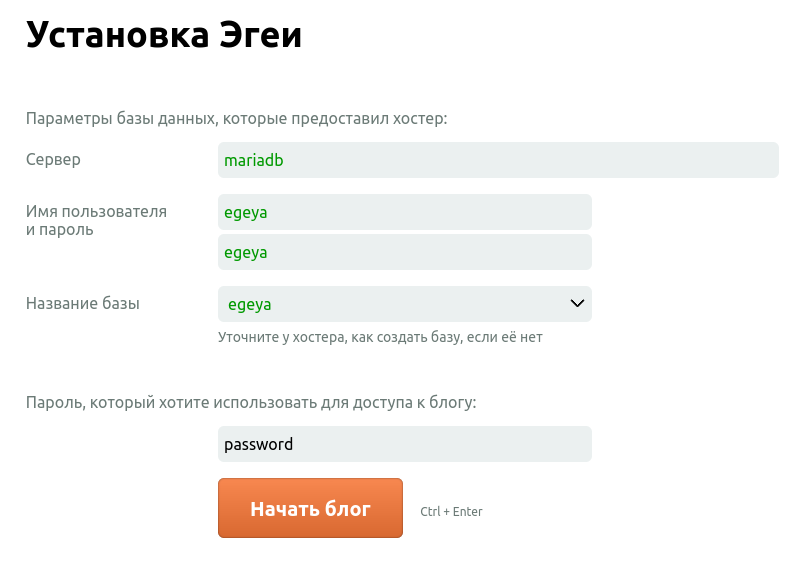
Go to
VIRTUAL_HOSTaddress and fill the Egeya setup form with data:DB Host: mariadb DB User: root DB Pass: egeya DB Database: <select "egeya" from the list> Admin pass: <specify yours> -
That's all.
Start / Stop
docker-compose up -d
docker-compose stop
Updates
- To update PHP version, go to .env, change version and run
docker-compose up -d - To update MariaDB version, go to .env, change version and run
docker-compose up -d - To update blog version, go to .env, change version and run
docker-compose up -d
It doesn't affect an important data as it's been stored in
${PATH_VOLUMES}/user— all user-specific settings${PATH_VOLUMES}/theme— here you can paste your custom theme${PATH_VOLUMES}/pictures— uploaded images${PATH_VOLUMES}/audio— uploaded audio${PATH_VOLUMES}/video— uploaded video${PATH_VOLUMES}/mariadb— database data